

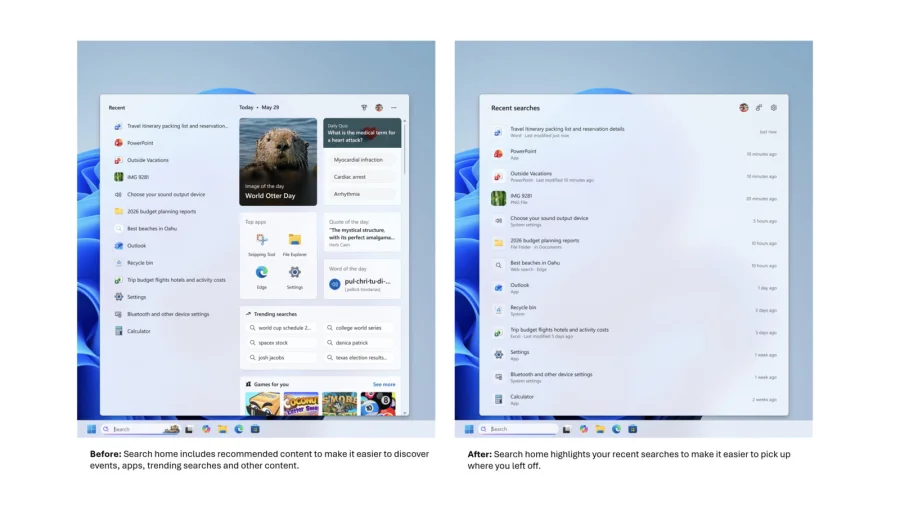
For years, the Windows Search Box has been a quiet workhorse — always there, often ignored, occasionally frustrating. Now, Microsoft is giving it a long-overdue polish. The company is making the Windows Search Box more streamlined and useful, aiming to reduce visual clutter while improving how quickly and accurately it finds what you need. For the hundreds of millions of Windows 11 users, this isn't just a cosmetic tweak — it's a fundamental improvement to one of the most-used features on the desktop.
What’s Changing in the Windows 11 Search Box
The core of the update is simplicity. Microsoft is removing redundant elements, such as extra icons and text labels that crowded the search field. The new design presents a cleaner, more focused input area, with results appearing in a less busy panel. Early testers report that the search algorithm itself feels faster, with better prioritization of local files, installed apps, and system settings over web results. The goal is to make the Search Box feel like a natural extension of the desktop — not a separate, clunky tool.
Why This Matters for Everyday Users
Think about how often you use the Search Box: to launch an app, find a document, adjust a setting, or open a folder. Every second saved adds up. For students, professionals, and casual users alike, a streamlined Search Box means less time hunting and more time doing. The update also reduces cognitive load — a cleaner interface means less visual noise, which can help you focus. For those who rely on keyboard shortcuts, the improved search accuracy could make the Windows key + typing workflow even more efficient.
The Gradual Healing of Windows 11
This update is part of a broader, quieter trend: Microsoft is slowly but steadily refining Windows 11 after a rocky launch. Early versions of the OS were criticized for missing features, inconsistent design, and performance issues. Over the past two years, the company has been patching, updating, and listening. The Search Box streamlining is another step in that journey — a sign that Microsoft is prioritizing user experience over flashy new features. Bit by bit, Windows 11 is healing.
Who Benefits Most from the Streamlined Search
Power users who navigate Windows primarily through search will notice the biggest difference. But the update also helps less tech-savvy users who may have found the old Search Box confusing or slow. For anyone who has ever typed a query and waited too long for results, or been overwhelmed by a cluttered results panel, this change is welcome. The streamlined design also makes the Search Box more accessible on smaller screens, such as tablets and laptops with high-resolution displays.
Microsoft’s Quiet Approach to the Update
Microsoft has not made a formal announcement about the Search Box changes. Instead, the update is appearing in Windows 11 Insider Preview builds, where it is being tested by enthusiasts and developers. This is typical for the company — it often refines features based on feedback before a wider rollout. The lack of fanfare suggests Microsoft is confident in the improvement but wants to ensure stability before pushing it to all users. For now, the changes are visible to those running the latest Insider builds.
What the Streamlined Search Box Actually Does Differently
Beyond the visual cleanup, the update includes under-the-hood improvements. The search indexer has been optimized to return results faster, especially for local files and recently used apps. The results panel now groups related items more intelligently — for example, searching for "settings" will show system settings first, rather than mixing them with web results. The Search Box also integrates more smoothly with Windows widgets and the taskbar, creating a more cohesive experience.
Confirmed Facts vs What Remains Unclear
Confirmed: The streamlined Search Box is being tested in Windows 11 Insider builds. The design removes redundant icons and text. Search performance has been improved for local files and apps. Unclear: The exact timeline for a stable release. Whether all users will see the same changes. If Microsoft will add new features, such as AI-powered suggestions, in future updates. The company has not commented on these specifics.
Risks and Balanced View
While the update is largely positive, some users may miss the old layout, especially those who relied on specific icons or shortcuts. There is also a risk that the streamlined design could feel too minimal for power users who want more control over search filters. Additionally, any change to a core feature carries the potential for bugs or compatibility issues with third-party software. Microsoft will need to ensure the update doesn't break existing workflows, particularly for enterprise users who depend on search for productivity.
A Wider Trend: Microsoft’s Focus on Core Experience
The Search Box streamlining fits into a larger pattern at Microsoft: improving the fundamentals rather than chasing trends. While competitors like Apple and Google are pushing AI assistants and voice search, Microsoft is quietly making the basic search experience better. This approach reflects a recognition that most users still rely on traditional search for daily tasks. By refining the core, Microsoft is building a stronger foundation for future innovations, such as deeper AI integration in Windows.
Practical Guidance for Windows 11 Users
If you want to try the streamlined Search Box now, join the Windows Insider Program and install the latest Dev or Beta build. Be aware that Insider builds can be unstable, so back up your data first. For most users, the update will arrive automatically via Windows Update in the coming months. To prepare, keep your system updated and check for optional updates in Settings. Once the update lands, take a few minutes to explore the new Search Box — you might find it saves you more time than you expect.
Future Outlook: What’s Next for Windows Search
Looking ahead, Microsoft is likely to build on this foundation. The streamlined Search Box could eventually integrate with Copilot, Microsoft’s AI assistant, offering natural language queries and smarter file suggestions. There is also speculation that the Search Box could become more context-aware, adapting results based on the time of day or your recent activity. For now, the focus is on getting the basics right — and this update suggests Microsoft is listening to what users actually need.
Our Take
The Windows 11 Search Box streamlining is a small but meaningful improvement. It shows that Microsoft understands the value of refining existing features rather than always chasing the next big thing. For users, this means a faster, less frustrating experience with one of the most-used tools on the desktop. While the update won’t make headlines, it will make a real difference in daily productivity. That’s the kind of progress that matters most.
Frequently Asked Questions
When will the streamlined Windows 11 Search Box be available to everyone?
Microsoft is currently testing the update in Insider builds. A stable release is expected in a future Windows 11 feature update, likely within the next few months. The exact date has not been announced.
Will the streamlined Search Box change how I search for files?
Yes, but in a positive way. The search algorithm has been optimized to return local files and apps faster. The results panel is also cleaner, making it easier to find what you need without scrolling through clutter.
Do I need to do anything to get the update?
No. The update will arrive automatically via Windows Update when it is ready for stable release. If you want to try it early, you can join the Windows Insider Program, but be aware of potential instability.
Will the streamlined Search Box work with third-party search tools?
Microsoft has not provided details on compatibility with third-party tools. Most popular search utilities should continue to work, but some may need updates to integrate with the new design. Check with the software developer for specific compatibility.