
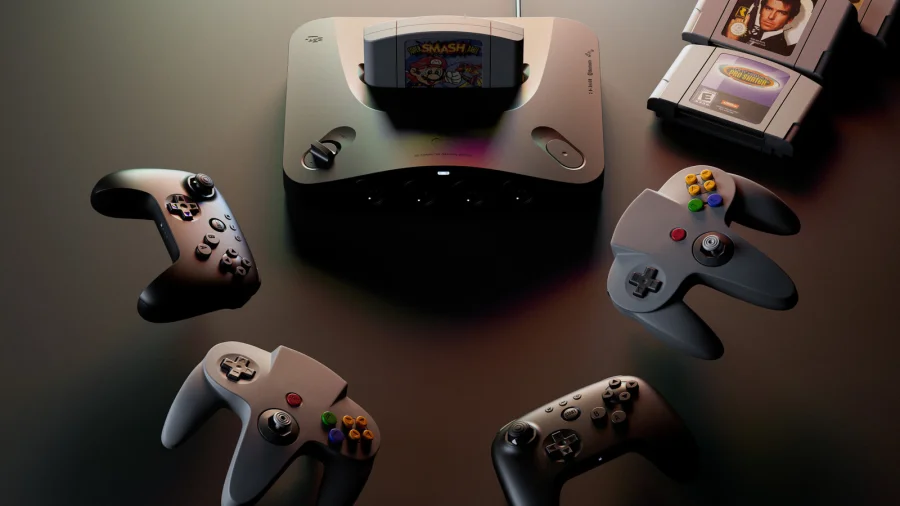
For anyone who has ever thrown a controller in frustration after losing an hour of progress in Banjo-Kazooie or The Legend of Zelda: Ocarina of Time, relief has finally arrived. The Analogue 3D, the premium console that faithfully recreates the Nintendo 64 experience, has just received a game-changing update. Firmware version 1.3.0 introduces a feature called "Memories" — essentially, save states that let you save your game at any moment, not just at designated save points.
This is the feature that retro gaming enthusiasts have been waiting for. No more replaying entire levels because of one missed jump. No more agonizing over a single death that sends you back to the last checkpoint. The Analogue 3D now gives you control over your own progress.
What the New "Memories" Feature Actually Does
The "Memories" feature is a save state system built directly into the Analogue 3D’s operating system. Unlike the original N64 hardware, which relied on cartridge-based saves or in-game save points, this update allows you to create a snapshot of your exact game progress at any moment. You can then load that snapshot later, picking up precisely where you left off.
This is a massive quality-of-life improvement. For games that are notoriously difficult or have long stretches between save points — think GoldenEye 007 or Conker’s Bad Fur Day — this feature effectively removes the punishment of failure. You can save before a tough boss fight, try different strategies, and reload if things go wrong.
How the Update Unfolded: From Firmware to Feature
The Analogue 3D launched to critical acclaim for its pixel-perfect output and compatibility with original N64 cartridges. However, one glaring omission was the lack of save states. Gamers who grew up with emulators or modern re-releases had come to expect this convenience. The community’s feedback was clear: they wanted the ability to save anywhere.
Analogue listened. Firmware version 1.3.0, now rolling out to all Analogue 3D units, delivers exactly that. The update is available through the console’s standard firmware update process, which can be done via an SD card or over the network if the console is connected.
Who Benefits Most from This Update
This update is a game-changer for several groups of players:
- Casual players who want to enjoy classic N64 games without the punishing difficulty of the original era.
- Completionists who want to explore every corner of a game without fear of losing progress.
- Speedrunners and practice players who can now save before specific sections to practice difficult segments repeatedly.
- Parents introducing their kids to retro games — the save state feature makes it easier for younger players to enjoy older titles without frustration.
The emotional impact is significant. The Analogue 3D was already a premium product for nostalgia seekers. Now, it removes one of the biggest pain points of retro gaming: the inability to save when real life interrupts.
What Analogue Has Said About the Feature
Analogue has positioned "Memories" as a core feature of the 3D experience. In the official user guide, the company describes it as part of the console’s "3DOS Interface," alongside the library overview and controller configuration. The feature is designed to be intuitive: players can access it through the in-game menu, with dedicated hotkeys for saving and loading.
The company has not released a formal press statement about the update, but the inclusion of "Memories" in the official documentation signals that this is a permanent, supported feature — not a beta test or experimental addition.
How to Use the Save State Feature
Using "Memories" is straightforward. While playing a game, you can bring up the 3DOS interface and select the save state option. The console will create a save file that can be loaded at any time. The exact hotkey configuration is detailed in the user guide, but early reports from the community suggest the default mapping is intuitive.
One point of feedback from early adopters on Reddit is that the default Save and Load keys might feel reversed to some users. The community is already discussing this, and it’s likely that Analogue will consider user feedback for future updates.
Why This Update Matters Beyond One Console
The Analogue 3D’s save state update is part of a larger trend in retro gaming. As companies like Analogue, Nintendo (via Nintendo Switch Online), and various emulation projects bring classic games to modern audiences, the expectation for quality-of-life features has grown. Save states are no longer a luxury — they are a standard expectation.
This update also highlights the importance of listening to the community. The Analogue 3D was already a niche, premium product. By adding a feature that directly addresses the most common complaint, Analogue has strengthened its position as the go-to platform for serious retro gamers.
What Readers Should Know Now
If you own an Analogue 3D, update your firmware to version 1.3.0 as soon as possible. The process is simple and well-documented on Analogue’s support page. Once updated, you’ll have access to the "Memories" feature, which can be used with any N64 game cartridge.
For those considering buying an Analogue 3D, this update removes one of the last remaining objections. The console now offers a near-perfect retro experience with the convenience of modern save technology.
What Could Happen Next
With save states now live, the community is already speculating about what future updates might bring. Possibilities include:
- Multiple save slots for different points in the same game.
- Cloud save syncing for backing up progress.
- Enhanced hotkey customization based on user feedback.
Analogue has a history of supporting its consoles with meaningful updates. The 3D is likely to receive further refinements as the company continues to engage with its user base.
Our Take: Why This Story Matters Beyond One Console
This update is more than just a convenience feature. It represents a philosophical shift in how we approach retro gaming. The original N64 experience was defined by its limitations — limited saves, difficult gameplay, and the need for patience. The Analogue 3D’s save state feature acknowledges that while we love the games, we don’t have to love the frustrations that came with them.
For Indian gamers who grew up with the N64 — or discovered it later through emulation — this update makes the Analogue 3D a much more compelling purchase. It bridges the gap between nostalgia and modern expectations, allowing players to enjoy classic titles on their own terms.
In a market where retro gaming is growing rapidly, this kind of thoughtful update is what separates a good product from a great one.
FAQs
What is the Analogue 3D "Memories" feature?
"Memories" is a save state feature introduced in firmware version 1.3.0. It allows you to save your game progress at any point and load it later, regardless of the game’s built-in save system.
How do I update my Analogue 3D to get save states?
You can update your Analogue 3D by downloading the firmware from Analogue’s support page and installing it via an SD card, or by connecting the console to your network and using the built-in update feature.
Does the save state feature work with all N64 games?
Yes, the "Memories" feature works with any original N64 cartridge that is compatible with the Analogue 3D. It creates a system-level save state independent of the game’s own save system.
Can I have multiple save states for the same game?
Currently, the feature supports saving and loading one state at a time. Future updates may introduce multiple save slots based on community feedback.
Will using save states affect my game or cartridge?
No. Save states are stored on the Analogue 3D’s internal memory or SD card. They do not write to or modify the original game cartridge in any way.
Is the save state feature available on other Analogue consoles?
This feature is currently exclusive to the Analogue 3D. Other Analogue consoles like the Pocket or Super Nt have their own save state implementations, but the "Memories" system is specific to the 3D.