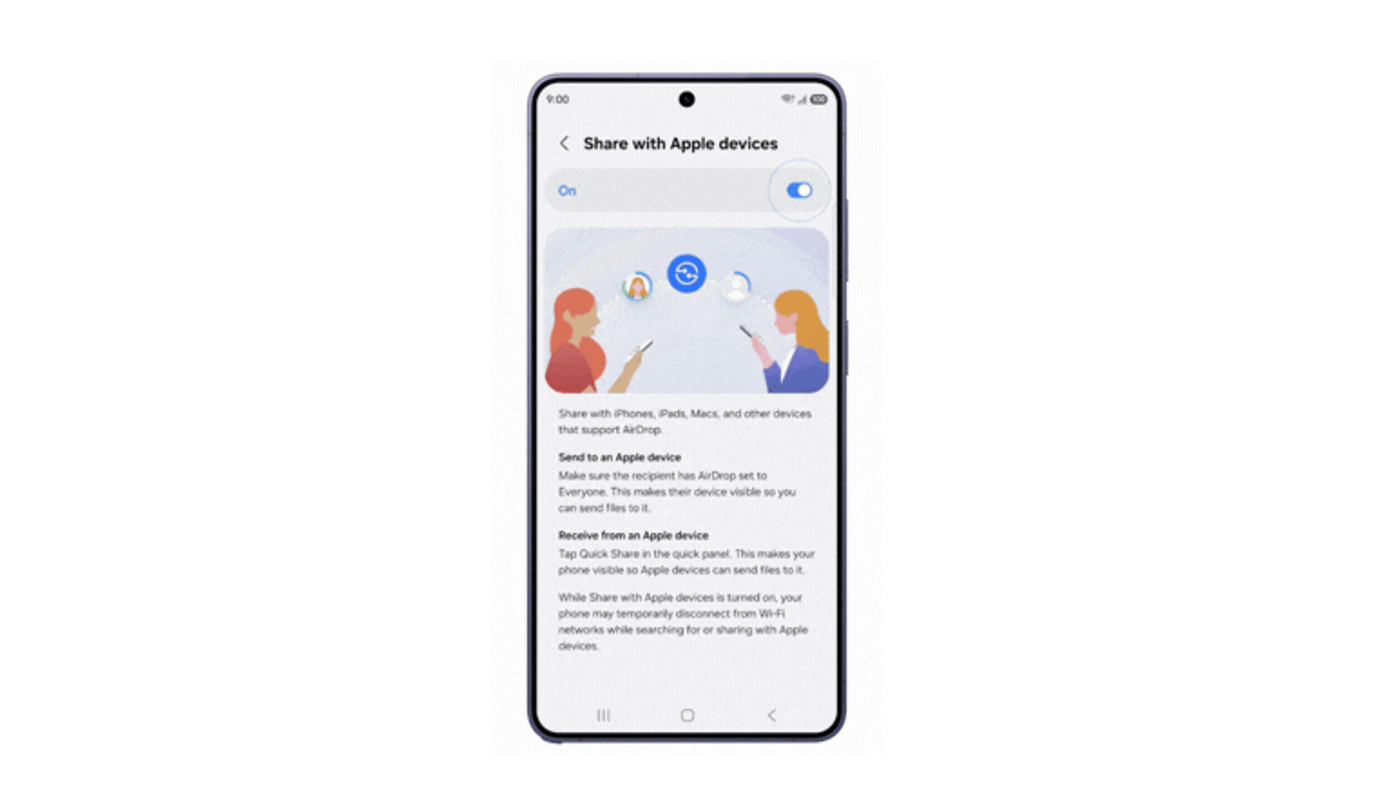
Samsung Electronics announced on March 22 that its Galaxy S26 series will support Apple AirDrop through the Quick Share feature, allowing seamless file transfers between Android and iOS devices. Starting March 23, Samsung Galaxy S26 users can send and receive photos and documents directly with iPhone users, bridging a long-standing gap in mobile ecosystem compatibility. This update enables cross-platform sharing without the need for third-party messaging apps or cloud storage links.
Samsung integrates AirDrop compatibility into Quick Share for Galaxy S26 users
Samsung Electronics confirmed the rollout of AirDrop support for its latest flagship, the Galaxy S26 series, following a technical partnership involving Google and Apple. The feature operates through Samsung’s existing Quick Share menu, which now recognizes Apple devices as valid targets for wireless transfers. This change means a Samsung user can select a high-resolution video and send it to a nearby iPhone user as if both were using the same operating system.
To receive files from an Apple device, Samsung users must adjust their visibility settings to "everyone for 10 minutes" within the Quick Share interface. This temporary window mirrors the security protocol Apple uses to prevent unsolicited file requests from strangers in public spaces. Samsung officials stated that this specific setting ensures the device remains discoverable to the proprietary protocols used by Apple’s AirDrop system.
The technology relies on a unified sharing standard that Google previously introduced on its Pixel 10 handsets in late 2024. By adopting this standard, Samsung allows the Galaxy S26 to communicate across the "walled garden" that previously restricted AirDrop to Apple-only hardware. This move simplifies the process of moving large files, which often lose quality when sent through compressed messaging platforms like WhatsApp.
Google and Samsung expand the cross-platform sharing initiative
The arrival of AirDrop support on Samsung devices follows a commitment made by Google in February to expand interoperability across the Android ecosystem. Google first launched this capability on the Pixel 10 series, marking the first time an Android manufacturer officially supported the Apple-developed sharing protocol. Samsung is the second major manufacturer to adopt the technology, bringing it to a much larger global user base.
Historically, Android and iOS users had to rely on workarounds such as email, Bluetooth pairing, or specialized apps like WeTransfer to share files locally. These methods were often slow or required an active internet connection, unlike the peer-to-peer Wi-Fi technology used by AirDrop and Quick Share. The integration represents a shift in how the two largest mobile platforms handle local data exchange.
Samsung has used various sharing brands over the years, including S Beam and Link Sharing, before settling on Quick Share as its primary tool. By merging its local sharing capabilities with Google’s updated framework, Samsung is aligning its software with broader industry standards. This alignment helps reduce the friction users face when switching between different smartphone brands or sharing content with friends who use different devices.
Direct file sharing removes barriers for mixed-device households and workplaces
The primary beneficiaries of this update are individuals who operate in environments where both iPhones and Samsung devices are present. In professional settings, photographers or designers can now move assets between a Samsung phone and a colleague's iPhone or Mac without using cables. This immediate transfer capability saves time and preserves the original metadata and quality of the files being moved.
Families often face difficulties when sharing photos from events if members use different phone brands, leading to "green bubble" versus "blue bubble" frustrations. With AirDrop support on the Galaxy S26, these users can now share photo albums instantly regardless of the logo on the back of the device. This change addresses one of the most common complaints regarding mobile platform fragmentation.
Retailers and service providers may also see a change in consumer behavior as the "lock-in" effect of AirDrop diminishes. For many Apple users, the ease of sharing files with other iPhone owners is a primary reason to stay within the iOS ecosystem. By offering the same convenience, Samsung makes the Galaxy S26 a more viable alternative for those who previously feared losing their sharing capabilities.
Phased rollout begins in Korea before reaching global markets
Samsung will begin the software rollout in its home market of South Korea on March 23, according to the official company announcement. Following the initial release, the update will expand to other major regions through a phased deployment. The company has confirmed that the following areas will receive the update shortly after the Korean launch:
- North America (United States and Canada)
- Europe (All major EU territories and the UK)
- Hong Kong and Japan
- Latin America
Users will likely receive a notification for a system update or a specific update for the Quick Share app via the Galaxy Store. Once the update is installed, the new sharing options will appear automatically within the share sheet of the gallery and file manager. Samsung has not provided specific dates for each region but typically completes such rollouts within a few weeks of the initial launch.
Privacy protocols and hardware limitations remain a factor
While the feature increases convenience, it introduces specific privacy considerations that users must manage manually. The "everyone for 10 minutes" setting is a manual toggle, meaning the device will not stay open to strangers indefinitely. If a user forgets to turn off visibility, the system automatically reverts to "Contacts Only" after the timer expires to prevent "AirDropping" of inappropriate content by nearby strangers.
There is currently no confirmation that this feature will be backported to older Samsung models like the Galaxy S25 or S24. The announcement specifically names the Galaxy S26 series, suggesting that certain hardware requirements or licensing agreements might limit the initial scope. Samsung stated that additional devices should receive compatibility soon, but did not list specific models or a timeline for older hardware.
Users should also note that transfer speeds may vary depending on the Wi-Fi and Bluetooth versions supported by both the sending and receiving devices. While the protocol is now compatible, the physical hardware still dictates how fast a 4K video file can move through the air. In crowded areas with high signal interference, the connection may still drop or fail, similar to standard AirDrop performance.
Samsung expects to expand compatibility to more Galaxy devices
The company is expected to monitor the performance of AirDrop support on the S26 series before committing to a wider release. If the integration proves stable, Samsung may bring the feature to its foldable lineup, including the Galaxy Z Fold and Z Flip series, later this year. Official confirmation of these updates will likely depend on user feedback and technical stability during the first month of the S26 rollout.
Developers are also looking at how this interoperability might extend to other form factors, such as tablets and laptops. Samsung’s Galaxy Book series already features deep integration with Quick Share, and adding AirDrop support would allow these PCs to receive files from iPhones directly. This would position Samsung’s ecosystem as a more open alternative to the strictly controlled Apple environment.
Key Numbers and Facts
The confirmed figures behind this story at a glance.
Key Fact Detail Main person or organisation Samsung Electronics Main action or decision Adding Apple AirDrop support to Quick Share Date or period Starts March 23 Location Korea (Initial), Global (Phased) Amount, figure, or scale Galaxy S26 Series (All models) Previous status Quick Share limited to Android/Windows Current status Cross-platform sharing enabled Primary effect Direct file transfer between Samsung and iPhone Next confirmed step Rollout to North America and EuropeThe end of the digital divide between Android and iOS file sharing
The integration of AirDrop support into the Samsung Galaxy S26 marks a significant shift in the mobile industry's approach to consumer convenience. For over a decade, the inability to share files easily between the two dominant platforms has been a source of constant user frustration. By adopting a shared standard, Samsung and Google are acknowledging that users live in a multi-platform world where hardware brand should not dictate the ability to share a simple photo. This move effectively turns the Galaxy S26 into a bridge between two previously isolated digital worlds.
Frequently Asked Questions
How do I use AirDrop on my Samsung Galaxy S26?
You can use AirDrop by opening the Quick Share menu and setting your visibility to "everyone for 10 minutes." Once this is active, an iPhone user nearby will see your Samsung device in their AirDrop list. You can then accept the file transfer just as you would with any other Quick Share request.
Which Samsung phones support Apple AirDrop sharing?
Currently, only the Galaxy S26 series is confirmed to support this feature starting from the March 23 rollout. Samsung has indicated that more devices will receive this compatibility in the future, but they have not yet named specific older models. You will need the latest software update for the Quick Share app to see these options.
Is it safe to leave my Samsung phone visible to everyone?
The visibility setting is designed with a 10-minute safety timer to prevent long-term exposure to strangers. After 10 minutes, your phone will automatically hide itself from non-contacts to protect your privacy. It is best to only turn this feature on when you are actively expecting a file from someone nearby.